Data Structures: Collections and Containers
In computer science, a collection (often interchangeably referred to as a container) is a data structure that holds multiple values. These may be simple elements like numbers or text strings, or more complex objects like user-defined structures. Collections help you store, organize, and manipulate different types of data in your programs.
Choose a collection by listing the operations the program needs: lookup, insertion, deletion, iteration, ordering, and uniqueness. The right choice simplifies those operations and makes their performance costs predictable.
- At The Abstract Level, we focus on the conceptual understanding of collections, defining what they are and their characteristics. This includes how they store and retrieve items, whether it's based on a specific order (as in arrays or lists) or using unique keys (as in dictionaries or maps).
- The Machine Level refers to the practical implementation of collections, where we concentrate on efficiently realizing the abstract models. Factors like memory usage, operation speeds (insertion, deletion, search), and flexibility help determine the best data structures and algorithms for a specific task.
The abstract interface defines behavior, such as ordering and uniqueness. The implementation determines costs such as memory allocation, copying, pointer traversal, and cache misses. Consider both when comparing containers.
Every developer should really get to know collections well. It helps you pick the right type of collection for the job, making your code faster, more efficient, and easier to manage in the long run.
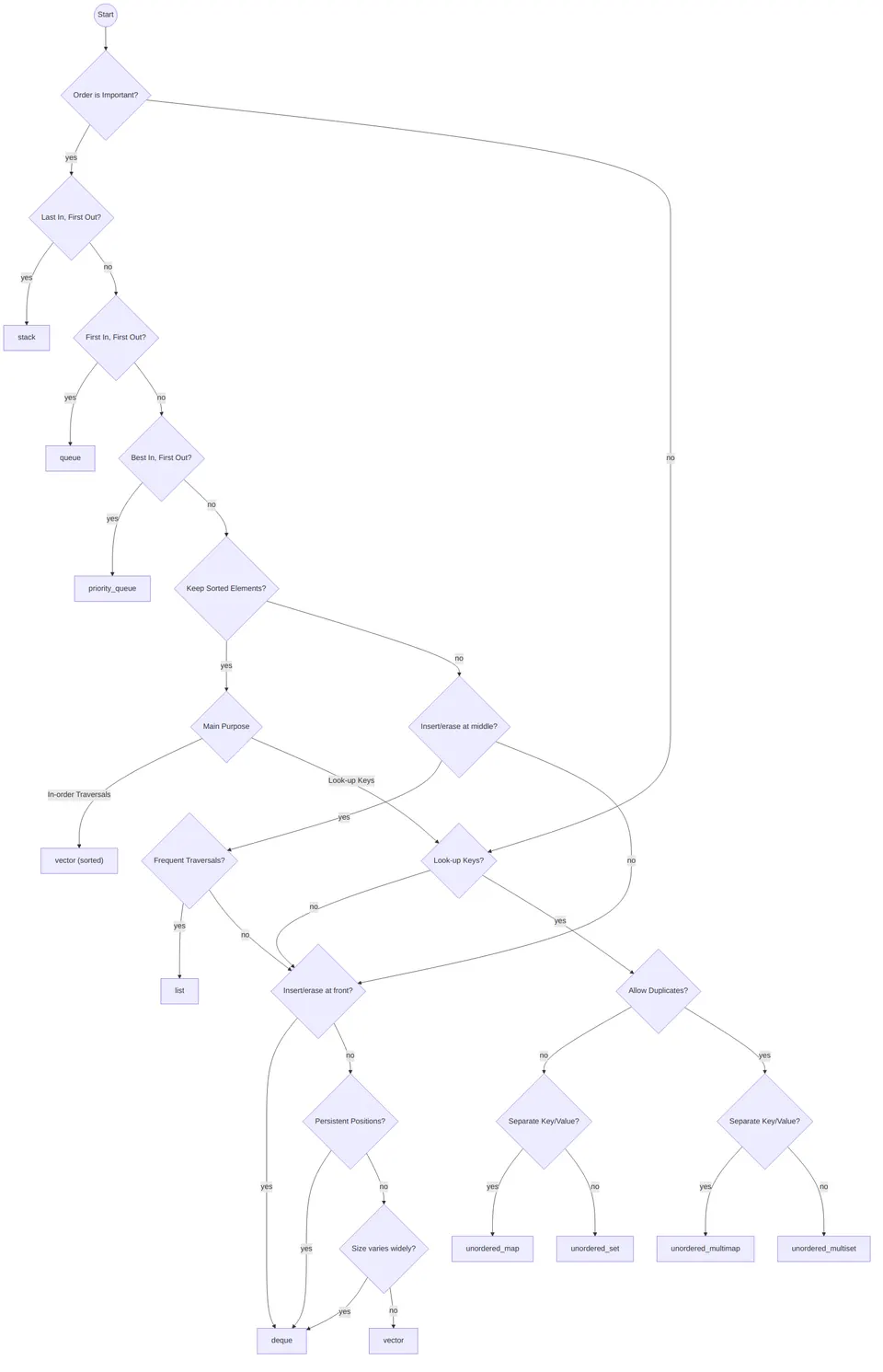
The interfaces below describe conceptual operations; exact method names and return values vary by implementation. Complexity tables assume constant-time element comparisons, moves, and hashing unless otherwise stated. Here, $n$ is the number of stored elements.
Linked Lists
A Linked List is a basic way to organize data where you have a chain of nodes. Each node contains two distinct parts:
- A value (or data), which could range from simple data types to more complex structures.
- A reference (commonly referred to as a link or a pointer) to the subsequent node in the sequence.
Importantly, the last node in the linked list points to a null value, effectively signifying the end of the list.
Linked lists are a great example of how “abstract vs machine level” matters. Abstractly, a list is just an ordered sequence. But machine-wise, an array and a linked list behave totally differently. A linked list trades away fast random access in exchange for flexibility in growing and shrinking without needing a big contiguous block of memory.
Linked lists can be highly valuable when the data doesn't require contiguous storage in memory or when the exact size of the data is undetermined at the time of memory allocation. While they can serve as an alternative to arrays, it's essential to note that linked lists generally have slower access times and are more challenging to manipulate due to their non-contiguous storage and absence of direct access to individual elements.
A quick “do/don’t” intuition that helps:
- Do consider a linked list when your operations naturally happen at the ends or via known node references (like “remove this node I already have”).
- Don’t reach for a linked list if you constantly need
list[i]style access, because every index lookup becomes a walk.
[HEAD]-->[1| ]-->[2| ]-->[3| ]-->[4| ]-->[NULL]Typical Interface
Here are some standard operations associated with linked lists:
is_empty(): This checks if the list is devoid of any elements.front(): This retrieves the first element in the list.append(element): This adds a new element to the end of the list.remove(index): This removes an element at a specified index.replace(index, data): This substitutes the element at a specified index with a new value.
Time Complexity
| Operation | Average case | Worst case |
|---|---|---|
| Access | O(n) |
O(n) |
| Insert | O(1) |
O(1) |
| Delete | O(1) |
O(1) |
| Search | O(n) |
O(n) |
The insertion and deletion rows assume the required links are already known. In a singly linked list, deleting an arbitrary node generally requires its predecessor; having only the node reference is insufficient. Appending is $O(1)$ with a tail pointer and $O(n)$ without one. Index-based removal and replacement require traversal.
One detail that’s easy to miss: linked-list insert/delete being O(1) is only true when you’re inserting/deleting at a spot you can reach in O(1), like the head, or a node reference you already hold. If you’re deleting “the element at index 500,” you still have to walk to index 500 first, which is O(n). So the real takeaway is: linked lists are great at local edits, not great at random access.
Common Applications
Linked lists find utility in a wide variety of areas including, but not limited to:
- Storing items that undergo frequent addition or removal operations. This is due to the cost-effective manipulation (insertion/deletion) capabilities of linked lists.
- Implementing other high-level data structures such as stacks and queues.
- Storing buckets in hash tables or elements in associative arrays.
- Maintaining key-value pairs in symbol tables or dictionaries.
- Representing nodes in advanced structures like graphs or tree data structures.
- Managing allocation or deallocation of memory blocks in memory management systems.
- Storing sequences of operations to support undo or redo functionality in software applications.
Implementation Details
Linked lists can be implemented in various ways, largely dependent on the programming language used. A conventional implementation strategy involves defining a custom class or structure to represent a node. This class encapsulates a value and a reference to the next node. Additionally, methods for adding, removing, and accessing elements are provided to manipulate the list.
In some languages, linked lists are provided as part of the standard library, abstracting away the underlying implementation details and providing a rich set of functionality.
Vectors
In computer science, a vector can be thought of as a dynamic array with the ability to adjust its size as required. While similar to traditional arrays, vectors distinguish themselves with their superior flexibility and efficiency in numerous scenarios. They store elements in contiguous blocks of memory, ensuring swift access to elements through index-based referencing.
Vectors are often the “default best friend” in many programs because they play nicely with the hardware. Contiguous memory means the CPU cache can help you, iteration is fast, and indexing is instant. You get the simplicity of an array without the pain of manually resizing it.
Vectors are often favored over low-level arrays due to their augmented feature set and integrated safety mechanisms. These characteristics contribute to their easier usability and overall reliability.
-------------------------
| 0 | 1 | 2 | 3 | 4 | 5 |
-------------------------
Typical Interface
Some of the commonly used operations for vectors are:
sort(start, end): This function sorts the elements in the specified range within the vector.reverse(start, end): This operation reverses the order of elements between specified positions.size(): This function retrieves the current number of elements in the vector.capacity(): This retrieves the maximum number of elements the vector can hold before needing to resize.resize(new_size): This operation alters the vector size, adding or removing elements as necessary.reserve(new_capacity): This increases the vector capacity, if required, without changing the vector size.
Time Complexity
| Operation | Cost | Worst case per operation |
|---|---|---|
| Access by index | O(1) |
O(1) |
| Append | Amortized O(1) |
O(n) |
| Remove last | O(1) without shrinking |
O(1) without shrinking |
| Insert or delete at an arbitrary position | O(n) |
O(n) |
| Search unsorted values | O(n) |
O(n) |
Appending is amortized $O(1)$ when capacity grows geometrically: although an individual reallocation copies $O(n)$ elements, a sequence of $n$ appends takes $O(n)$ total work. Amortized analysis concerns a sequence of operations and does not assume random inputs. Removing the last element is constant time unless the implementation shrinks its buffer. Inserting or deleting in the middle shifts the remaining elements.
Appending to a vector is usually cheap, while insertion at the front shifts every existing element. Reallocation may move the whole buffer. If the approximate final size is known, reserving capacity can avoid repeated reallocations without changing the current size.
Common Applications
Vectors can be leveraged for a wide array of tasks, such as:
- Storing collections of values. Vectors are adept at storing and manipulating ordered lists of homogenous data types.
- Executing matrix operations. Vectors provide a good structure for representing matrices and performing computations on them.
- Implementing various search and sorting algorithms. Due to their continuous memory allocation and indexing, vectors are ideal for executing such algorithms.
- Creating intricate data structures. Vectors can serve as foundational building blocks in the implementation of more complex data structures.
Implementation Details
Vectors are typically implemented using an array of elements accompanied by additional metadata such as the current size and total capacity. When a resize operation is necessary, a new, larger array is created, and the existing elements are copied over to the new array. As resizing can be time and resource-consuming, vectors often allocate extra memory ahead of time to minimize the frequency of resizing.
In some programming languages or libraries, containers may be described as vector-like even if they are internally implemented using other data structures, such as linked lists; however, regardless of such claims, a true vector (or dynamic array) is fundamentally defined by its contiguous memory storage, which ensures efficient random access and predictable time complexity for indexing operations. While alternative implementations might present a similar interface to the programmer, they cannot fully replicate the behavior or performance characteristics of a standard vector, especially for indexing, because using non-contiguous structures like linked lists inherently changes how these operations work.
Stacks
A stack is a fundamental data structure that models a First-In-Last-Out (FILO) or Last-In-First-Out (LIFO) strategy. In essence, the most recently added element (the top of the stack) is the first one to be removed. This data structure is widely utilized across various programming languages to execute a range of operations, such as arithmetic computations, character printing, and more.
Stacks feel almost too simple, until you realize how often your brain already uses them. “Undo” in an editor? Stack. Nested function calls? Stack. Matching parentheses? Stack. Any time the most recent thing needs to be handled first, a stack fits naturally and keeps your logic clean.
[5]  <- top
[4]
[3]
[2]
[1]  <- bottom
Typical Interface
Typical operations associated with a stack include:
push(element): This method places a new element on top of the stack, effectively becoming the most recent addition.pop(): This method returns the top element of the stack and simultaneously removes it.top(): This method simply returns the top element without removing it from the stack, allowing you to inspect the most recent addition.is_empty(): This method checks if the stack is empty, a useful operation before attempting topop()ortop()to prevent errors.
Time Complexity
| Operation | Average case | Worst case |
|---|---|---|
| Access | O(n) |
O(n) |
| Insert (Push) | O(1) |
O(1) |
| Delete (Pop) | O(1) |
O(1) |
| Search | O(n) |
O(n) |
Peeking at the top is $O(1)$. The access row refers to reaching an arbitrary deeper element, which a stack interface does not normally expose. Push and pop are worst-case $O(1)$ for a linked stack; for a dynamic-array stack, push is amortized $O(1)$ and can take $O(n)$ when the buffer grows.
A quick intuition: stacks aren’t meant for “random access.” If you find yourself wanting “the 7th element from the top,” you’re fighting the data structure. The win is that they make a certain workflow effortless: add to top, remove from top, repeat.
Common Applications
Stacks are incredibly versatile and are used in a multitude of applications, including:
- Stack-oriented programming languages such as Forth and PostScript rely heavily on the stack data structure to perform operations.
- In graph algorithms, stacks are widely used in depth-first search (DFS) algorithms, where backtracking is necessary to explore unvisited nodes.
- When finding Eulerian cycles in graphs, stacks help keep track of the current path, as the cycle must visit every edge exactly once.
- Identifying strongly connected components in graphs often involves the use of stacks, as seen in algorithms like Tarjan’s algorithm, which utilizes stacks to efficiently track components.
Implementation Details
Stacks can be implemented using various underlying data structures, but arrays and linked lists are among the most common due to their inherent characteristics which nicely complement the operations and needs of a stack.
The choice between arrays and linked lists often depends on the specific requirements of the application, such as memory usage and the cost of operations. With an array, resizing can be expensive but access is faster, while with a linked list, insertion and deletion are faster but more memory is used due to the extra storage of pointers.
Queues
A queue is a fundamental data structure that stores elements in a sequence, with modifications made by adding elements to the end (enqueuing) and removing them from the front (dequeuing). The queue follows a First In First Out (FIFO) strategy, implying that the oldest elements are processed first.
Queues are what you reach for when “fairness” or “arrival order” matters. They show up everywhere you need to process tasks in the order they came in: requests, jobs, events, messages. If stacks are great for backtracking and nested logic, queues are great for pipelines and scheduling.
[1]  <- front
[2]
[3]
[4]
[5]  <- rear
Typical Interface
The standard operations associated with a queue are:
enqueue(element): This method adds a new element to the end of the queue.dequeue(): This method returns the front element of the queue and simultaneously removes it.front(): This method simply returns the front element without removing it from the queue, giving a peek at the next item to be dequeued.is_empty(): This method checks if the queue is empty, an important step before callingdequeue()orfront()to prevent errors.
Comparing Stacks and Queues
While stacks and queues are similar data structures, they differ in several aspects:
- The stack operates on a Last-In-First-Out (LIFO) principle, while the queue follows a First-In-First-Out (FIFO) principle.
- In terms of accessibility, stacks allow access only to the top element, while queues provide access to both the front and rear elements.
- Implementation of both stacks and queues can be done using arrays or linked lists, and FIFO queues commonly use circular arrays or double-ended queues (deques). A heap implements a priority queue, whose removal order depends on priority rather than arrival time.
- In usage, stacks are ideal for reversing the order of elements, while queues are useful for maintaining the original order of elements.
A nice way to make this stick: stacks are “latest-first,” queues are “earliest-first.” When you pick one, you’re picking the story your data will follow.
Time Complexity
| Operation | Average case | Worst case |
|---|---|---|
| Access | O(n) |
O(n) |
| Insert (Enqueue) | O(1) |
O(1) |
| Delete (Dequeue) | O(1) |
O(1) |
| Search | O(n) |
O(n) |
Peeking at the front is $O(1)$; the access row refers to an arbitrary interior element. Enqueue and dequeue are $O(1)$ with a linked queue that maintains both head and tail pointers, or with a fixed-capacity circular buffer. A growing circular buffer gives amortized $O(1)$ enqueue. Removing index zero from an ordinary dynamic array shifts elements and takes $O(n)$.
Common Applications
Queues are incredibly versatile and find use in a variety of real-world scenarios, including:
- In resource scheduling, queues are used to manage requests for resources like servers, printers, or CPU tasks, ensuring they are handled in the order they are received.
- Communication systems rely on queues to handle data packets and messages in a FIFO manner, making them the ideal data structure for this purpose.
- Simulations of real-world systems, such as event processing or customer service, often process tasks in a FIFO order, which aligns naturally with queue usage.
- In Breadth-First Search (BFS) for graph algorithms, a queue is used to keep track of the vertices that need to be processed.
Implementation Details
Queues can be implemented using various underlying data structures, including arrays, linked lists, circular buffers, and dynamic arrays. The choice of implementation depends on the specific requirements of the application, such as memory usage, the cost of operations, and whether the size of the queue changes frequently.
Heaps
A heap is a specialized tree-based data structure that satisfies the heap property. There are two main types of heaps: max-heaps and min-heaps.
- In a max-heap, the keys of parent nodes are always greater than or equal to those of the children, with the maximum key present at the root node.
- In a min-heap, the keys of parent nodes are always less than or equal to those of the children, with the minimum key present at the root node.
The binary heaps discussed here are complete binary trees, which means they are filled at all levels, except the last, which is filled from left to right. This structure ensures that the heap remains balanced.
Heaps are what you use when you don’t just want “the next item,” you want “the most important next item.” That’s the whole personality of a heap: it’s built to make the minimum or maximum easy to grab repeatedly, even while new things keep arriving.
[100]
├── [19]
│   ├── [17]
│   └── [3]
└── [36]
    ├── [25]
    └── [1]
Typical Interface
The basic operations of a heap are as follows:
insert(value): Adds a new element to the heap while ensuring that the heap property is preserved.search(value): Searches for a specific value in the heap. Note that heaps do not allow efficient arbitrary searches.remove(value): Deletes a specific value from the heap, then restructures the heap to maintain its properties.
In practice, heaps shine most when you remove min/max, not arbitrary values. That’s why many heap APIs focus on push / pop (or insert / extract_min). Arbitrary remove(value) can exist, but it’s usually not the main event and often needs extra bookkeeping to be efficient.
Time Complexity
| Operation | Average case |
|---|---|
| Find min/max | O(1) |
| Delete min/max | O(log n) |
| Insert | O(log n) |
| Merge | O(m log(m+n)) |
The table describes a binary heap. Root lookup, insertion, and root removal have these worst-case heap-operation bounds, excluding buffer reallocation. Merging by inserting all $m$ elements into an $n$-element heap takes $O(m\log(m+n))$; concatenating the arrays and applying bottom-up heap construction takes $O(m+n)$. Arbitrary-value search takes $O(n)$, while removing a known index takes $O(\log n)$ after restoring heap order.
These time complexities make heaps especially useful in situations where we need to repeatedly remove the minimum (or maximum) element.
Common Applications
Heaps are versatile and find widespread use across various computational problems:
- In graph algorithms, heaps are used in algorithms like Dijkstra's for finding shortest paths and Prim's for constructing minimum spanning trees.
- Priority queues are efficiently implemented using heaps, as they provide fast insertion and extraction of the highest or lowest priority elements.
- In sorting, the heap sort algorithm utilizes heap properties to sort an array in-place, achieving a worst-case time complexity of $O(n \log n)$.
Implementation Details
Heaps can be represented efficiently using a one-dimensional array, which allows for easy calculation of the parent, left, and right child positions. The standard mapping from the heap to this array representation is as follows:
- In a heap, the root of the tree is stored at index
1of the array representation. - The left child of any node at index
iis positioned at index2*iin the array. - The right child of a node located at index
ican be found at index2*i + 1. - To find the parent of any node at index
i, calculate the index asfloor(i/2).
This layout keeps the parent-child relationships consistent and makes navigation within the heap straightforward and efficient.
One small real-world note: many implementations store the root at index 0 instead of 1. The children of index i are then 2*i + 1 and 2*i + 2, and the parent of a non-root node is floor((i-1)/2). The core idea stays the same: the array layout is what makes heaps fast and compact.
Binary Search Trees (BST)
A Binary Search Tree (BST) is a type of binary tree where each node has up to two children and maintains a specific ordering property among its values. For every node, the values of all nodes in its left subtree are less than its own value, and the values of all nodes in its right subtree are greater than its own value. In a well-balanced BST, this property enables efficient lookup, addition, and deletion operations, ideally distributing the nodes evenly across the left and right subtrees. This presentation assumes distinct keys. A BST can support duplicates by storing a count or a collection of values per key, provided insertion, lookup, and deletion use the same policy.
BSTs are the “ordered dictionary” idea in tree form. You get structure (everything left is smaller, everything right is bigger), which means you can search by repeatedly eliminating half the remaining options, if the tree stays balanced. That “if” is why the next sections (AVL and Red-Black trees) exist.
#
      [4]
     /   \
   [2]   [5]
  /   \     \
[1]   [3]   [6]
Typical Interface
The fundamental operations provided by a BST are:
insert(value): Inserts a new value into the tree, maintaining the BST property.search(value): Searches for a specific value in the tree. If the value exists, the operation returns the node. If not, it typically returnsnull.remove(value): Deletes a value from the tree, preserving the BST property. If the node to be removed has two children, it's replaced with its in-order predecessor or successor.minimum(): Retrieves the smallest value in the tree, which is the leftmost node.maximum(): Retrieves the largest value in the tree, which is the rightmost node.
Time Complexity
The efficiency of BST operations depends on the height of the tree. Each search, insertion, or deletion takes $O(h)$ for height $h$. A balanced tree guarantees $h=O(\log n)$; the average-case column for an ordinary BST assumes a suitable distribution, such as random insertion order. However, in the worst-case scenario (a degenerate or unbalanced tree), the time complexity degrades to O(n).
| Operation | Average case | Worst case |
|---|---|---|
| Access | O(log n) |
O(n) |
| Insert | O(log n) |
O(n) |
| Delete | O(log n) |
O(n) |
| Search | O(log n) |
O(n) |
This is the big caution label on plain BSTs: if you insert sorted data into a basic BST, it can collapse into a linked list shape, and you lose the whole point. Balanced variants exist because real data isn’t always friendly.
Implementation Details
A BST is typically implemented using a node-based model where each node encapsulates a value and pointers to the left and right child nodes. A special root pointer points to the first node, if any.
Insertion, deletion, and search operations are often implemented recursively to traverse the tree starting from the root, making comparisons at each node to guide the direction of traversal (left or right). This design pattern exploits the recursive nature of the tree structure and results in clean, comprehensible code.
AVL Trees
Named after its inventors, G.M. Adelson-Velsky and E.M. Landis, AVL trees are a subtype of binary search trees (BSTs) that self-balance. Unlike regular BSTs, AVL trees maintain a stringent balance by ensuring the height difference between the left and right subtrees of any node is at most one. This tight control on balance guarantees optimal performance for lookups, insertions, and deletions, making AVL trees highly efficient.
AVL trees are what you use when you want BST behavior without the “it might turn into a stick” risk. They pay a little extra work during updates (inserts/deletes) to keep the tree shaped nicely. The payoff is predictability: searches stay reliably fast.
#
       [20]
      /    \
   [10]    [30]
  /   \     /   \
[5]  [15] [25]  [35]
Properties
The defining characteristics of AVL trees include:
- Every node's left and right subtrees differ in height by at most one.
- Both left and right subtrees of any node are also AVL trees, recursively applying the AVL property across the tree.
Typical Interface
AVL trees support standard BST operations with some modifications to maintain balance:
insert(value): Add a value to the tree while preserving the AVL properties.search(value): Find and return a node with the given value in the tree.remove(value): Delete a node with the given value while keeping the tree balanced.rotate_left(),rotate_right(): Perform rotation operations to balance the tree after insertions or deletions.
Time Complexity
| Operation | Average | Worst |
|---|---|---|
| Access | O(log n) |
O(log n) |
| Insert | O(log n) |
O(log n) |
| Delete | O(log n) |
O(log n) |
| Search | O(log n) |
O(log n) |
Common Applications
The AVL tree's self-balancing property lends itself to various applications, such as:
- Implementing associative arrays or sets in programming languages.
- Database storage and indexing, where rapid data retrieval is essential.
- Priority queues and dictionaries, where maintaining order matters.
- Word suggestion systems and spell checkers, which benefit from fast lookups.
- Networking algorithms and data compression, requiring efficient data structure.
Implementation Details
An AVL node needs rebalancing when the height difference reaches two, not merely when one subtree is taller. Rotations preserve the in-order sequence of keys. Choose a single rotation for an outside-heavy child, or a double rotation for an inside-heavy child; after deletion, a child with equal subtree heights uses a single rotation. Four types of rotations can occur based on the tree's balance state:
- Right rotation occurs when the left subtree of a node is taller than its right subtree. In this rotation, the node's left child becomes the new root, and the old root becomes the right child of this new root. The final step involves updating the heights of the affected nodes.
- Left rotation is used when the right subtree of a node is taller than its left subtree. During this rotation, the node's right child becomes the new root, while the old root becomes the left child of the new root. Afterward, the nodes' heights are updated accordingly.
- Right-left rotation is necessary when the right subtree of a node is taller, but the right child's left subtree is taller than its right subtree. This rotation involves first applying a right rotation on the right child, followed by a left rotation on the original node, with height updates for all affected nodes.
- Left-right rotation is applied when the left subtree of a node is taller, and the left child's right subtree is taller than its left subtree. The process starts with a left rotation on the left child, followed by a right rotation on the original node, and concludes with height updates.
These rotations keep AVL trees balanced, ensuring consistent performance.
Red-Black Trees
Red-Black trees are a type of self-balancing binary search trees, with each node bearing an additional attribute: color. Each node in a Red-Black tree is colored either red or black, and these color attributes follow specific rules to maintain the tree's balance. This balance ensures that fundamental tree operations such as insertions, deletions, and searches remain efficient.
If AVL trees are “strict about balance,” Red-Black trees are “relaxed but practical.” They allow a bit more imbalance than AVL trees, but in return they often do fewer rotations during updates. That’s why you see them a lot in standard libraries: they’re a great all-around choice for ordered maps/sets.
#
        (30B)
      /      \
   (20R)     (40R)
   /   \      /   \
(10B) (25B) (35B) (50B)
Properties
Red-Black trees abide by the following essential properties:
- Every node in the tree is colored either red or black.
- The root node of the tree is always black.
- All leaves (NIL or null nodes) are always black.
- If a node is red, then both its parent and its children nodes must be black.
- For each node, any simple path from this node to any of its descendant NIL nodes contains the same number of black nodes.
Typical Interface
Red-Black trees support typical BST operations, albeit with additional steps to manage node colors and balance:
insert(value): Add a value to the tree, managing colors and rotations to maintain balance.search(value): Find and return a node with the given value in the tree.remove(value): Delete a node with the given value, adjusting colors and performing rotations as necessary to keep the tree balanced.rotate_left(),rotate_right(): Perform rotation operations to maintain balance after insertions or deletions.
Time Complexity
| Operation | Average | Worst |
|---|---|---|
| Access | O(log n) |
O(log n) |
| Insert | O(log n) |
O(log n) |
| Delete | O(log n) |
O(log n) |
| Search | O(log n) |
O(log n) |
Common Applications
Red-Black trees find application in several areas, including:
- Kernel and system programming, where they are used in the internals of many operating systems.
- Implementing maps, sets, and multi-maps in programming languages like C++ (as part of the Standard Template Library) and Java (in the TreeMap and TreeSet classes).
- Building augmented ordered structures, such as order-statistic trees and interval trees. Splay trees and treaps are alternative BST designs, not structures built on red-black trees.
Implementation Details
Red-Black trees are a sophisticated binary search tree variant. They require careful management of node colors during insertions and deletions, often involving multiple rebalancing steps:
- Perform standard BST insertion and color the new node red, with black NIL children.
- If the new node is the tree root, it's colored black to satisfy the Red-Black tree properties.
- If the new node's parent is black, no further action is needed.
- If the new node's parent is red, and its uncle (the sibling of its parent) is also red, recolor the parent and uncle black and the grandparent red. Continue checking from the grandparent because the violation may have moved upward; restore the root to black at the end.
- If the new node's parent is red, but its uncle is black or NIL, the tree might need a rotation or a series of rotations. These rotations can be left, right, or a combination of both based on the relative placements of the new node, its parent, and its grandparent. These rotations aim to restructure the tree while preserving the BST property and restoring the Red-Black tree properties.
These careful rotations and recoloring steps enable Red-Black trees to maintain balance and ensure efficient performance across various operations.
Hash Tables
Hash tables, often referred to as hash maps or dictionaries, are a type of data structure that employs a hash function to pair keys with their corresponding values. This mechanism enables efficient insertion, deletion, and lookup of items within a collection, making hash tables a fundamental tool in many computing scenarios. They are often used in contexts where fast lookup and insertion operations are important, such as database management and networking applications.
Hash tables organize entries for lookup by key. A name-to-phone-number map is a typical example. Hashing does not itself provide sorted order, and performance depends on how evenly keys are distributed and how collisions are handled.
+-----------------+
| Key | Value     |
|-----|-----------|
| K1  | V1        |
| K2  | V2        |
| K3  | V3        |
| K4  | V4        |
| ... | ...       |
+-----------------+
Typical Interface
Hash tables support a range of operations, which include:
is_empty(): This method checks if the hash table is empty and returnsTrueif so, orFalseotherwise.insert(key, value): This method adds a new key-value pair to the hash table.retrieve(key): This function fetches the value associated with a specified key.update(key, value): This operation modifies the value associated with a given key.delete(key): This function removes the key-value pair corresponding to the provided key from the hash table.traverse(): This method allows iteration over all the key-value pairs in the hash table.
Time Complexity
Expected constant-time lookup assumes bounded load, suitable hash distribution, and constant-time key hashing and comparison. Insertion is also amortized over occasional resizing; hashing a previously unhashed string of length $L$ can itself cost $O(L)$.
The performance of hash table operations depends on the hash function's quality, the strategy for resolving collisions, and the load factor (the ratio of the number of key-value pairs to the number of slots or buckets in the table).
| Operation | Average case | Worst case |
|---|---|---|
| Access | - |
- |
| Insert | O(1) |
O(n) |
| Delete | O(1) |
O(n) |
| Search | O(1) |
O(n) |
Expected constant-time lookup explains the usefulness of hash tables. Poor hash distribution or an overloaded table can lengthen searches substantially, so implementations manage their load factor and resize when needed.
Common Applications
Hash tables are ubiquitous across various domains, including:
- Databases and caching systems leverage hash tables to achieve quick insertion, deletion, and lookup operations.
- Networking applications use hash tables for rapid data retrieval and updates.
- Multi-pattern string search can use a hash table of pattern fingerprints. Basic Rabin–Karp uses rolling hashes and does not itself require a hash table.
- Data visualization often involves creating histograms, which use hash tables for binning data.
Implementation Details
The creation of a hash table involves setting up a data structure to store key-value pairs, designing a hash function to map keys to slots in the data structure, and devising a collision resolution strategy to handle instances where multiple keys hash to the same slot.
Common data structures used include arrays (for open addressing) and linked lists or balanced trees (for separate chaining).
Hash Function
A hash function takes a key (like a string) and turns it into a number, which then decides where to store the data in a table. The goal is to spread out the keys evenly so that no single spot gets overloaded. Adding character codes and reducing modulo the table size is a simple teaching example, but it gives all anagrams the same hash and distributes many inputs poorly. A practical string hash must account for character order. Prime moduli can help particular constructions, but cannot repair a fundamentally poor hash function.
One correction for accuracy: the hash function should depend on the key, not on the number of keys. A typical sketch is:
# x: key
# m: number of buckets
h(x) = hash(x) % m
That’s the whole game: turn the key into a hash code, then map it into the table range.
Collision Resolution
Collisions occur when two or more keys hash to the same slot. There are two common strategies to handle these collisions: chaining and open addressing.
Collisions are not a rare edge case, they’re expected. A good hash table design doesn’t try to “avoid collisions completely,” it tries to make collisions cheap to deal with. That’s why understanding the collision strategy matters: it tells you what “worst case” looks like in practice.
Chaining
With chaining, each slot or bucket in the hash table acts as a linked list. Each new key-value pair is appended to its designated list. While this approach allows for efficient insertions and deletions, the worst-case time complexity for lookups escalates to O(n), where n is the number of keys stored.
The following is an example:
index  Bucket
---------------------
0      -> ["apple"]
1      -> ["banana", "mango"]
2      -> ["cherry"]
3      -> []
4      -> ["dates", "elderberry", "fig"]
...
In the above example, "banana" and "mango" hash to the same index (1), so they are stored in the same linked list.
Open Addressing
In open addressing, the hash table is an array, and each key-value pair is stored directly in an array slot. When a collision arises, the hash table searches for the next available slot according to a predefined probe sequence. Common probing techniques include linear probing, where the table checks each slot one by one, and quadratic probing, which checks slots based on a quadratic function of the distance from the original hash.
Here's an example using linear probing:
index  Bucket
---------------------
0      -> "apple"
1      -> "cherry"
2      -> "banana"  (originally hashed to 1, moved due to collision)
3      -> "mango"   (originally hashed to 1, moved due to collision)
4      -> "dates"
5      -> "elderberry"
6      -> "fig"
...
In this case, "banana" and "mango" were hashed to index 1, but since it was already occupied by "cherry", they were moved to the next available slots (2 and 3, respectively).
Deleting an open-addressed entry must preserve its probe chain, for example with a tombstone or backward-shift deletion. Turning an occupied slot directly into a never-used empty slot can make later keys unreachable.
Practical considerations:
- Do understand that open addressing performance depends a lot on how full the table is (high load factors cause longer probe chains).
-
Rely on iteration order only if the implementation documents it. Some hash tables preserve insertion order, but hashing alone does not provide sorted order.
- Python